RVLink Roof Unit Deep Dive Part 2: Firmware Secrets and API Mapping

- Part 1: Hacking the RV Internet Part 1: Taking Direct Control of the Magnadyne RVLink RV2400
- Part 2.5: Rooting the RVLink MV2400: A Deep Dive into Configuration Backup/Restore Vulnerabilities (RVLink hacking part 2.5)
- Kings of the Castle: Achieving Total Webcfg Auth Bypass in RVLink Firmware
In Part 1, I performed initial network reconnaissance on the RVLink system, identifying the Indoor Unit (RV2458 - 192.168.10.1, likely Realtek SDK-based) and the Roof Unit (MV2400 - 192.168.10.254, running Linux/Nginx/Dropbear). I mapped out open ports, basic services, and identified a potential web API on the Roof Unit at /cgi-bin/mbox-config. The goal is direct programmatic control over the Roof Unit, bypassing the Indoor Unit.
Part 2: Peeling Back the Layers
This post details my journey digging into the Roof Unit's firmware, identifying its likely hardware origins, and reverse-engineering its core API handler. Shortly after the last blog post, I actually tried to socially engineer my way to a firmware image. I emailed Magnadyne's tech support, but they didn't have much (that they were willing) to offer me:
This system was update 2 years ago and there has not been any changes since. You have the latest firmware.
Given what I was still able to figure out and access on my own, as you'll see below, I can understand why they don't just hand the firmware files out. On the other hand... who cares? I digress.
1. Identifying the Hardware Base (COMFAST CF-E5)
While the RVLink units are branded by Magnadyne, the MAC addresses and internal components pointed towards COMFAST (Shenzhen Four Seas Global Link Network Technology) as the likely OEM. Efforts to visually match the MV2400 Roof Unit on COMFAST's public site were tricky, a common issue with OEM products. During this effort, I found a product listing for the Magnadyne system on Amazon that actually included front and back images of the roof unit with the FCC ID (ZGM-RV2402) clearly visible.
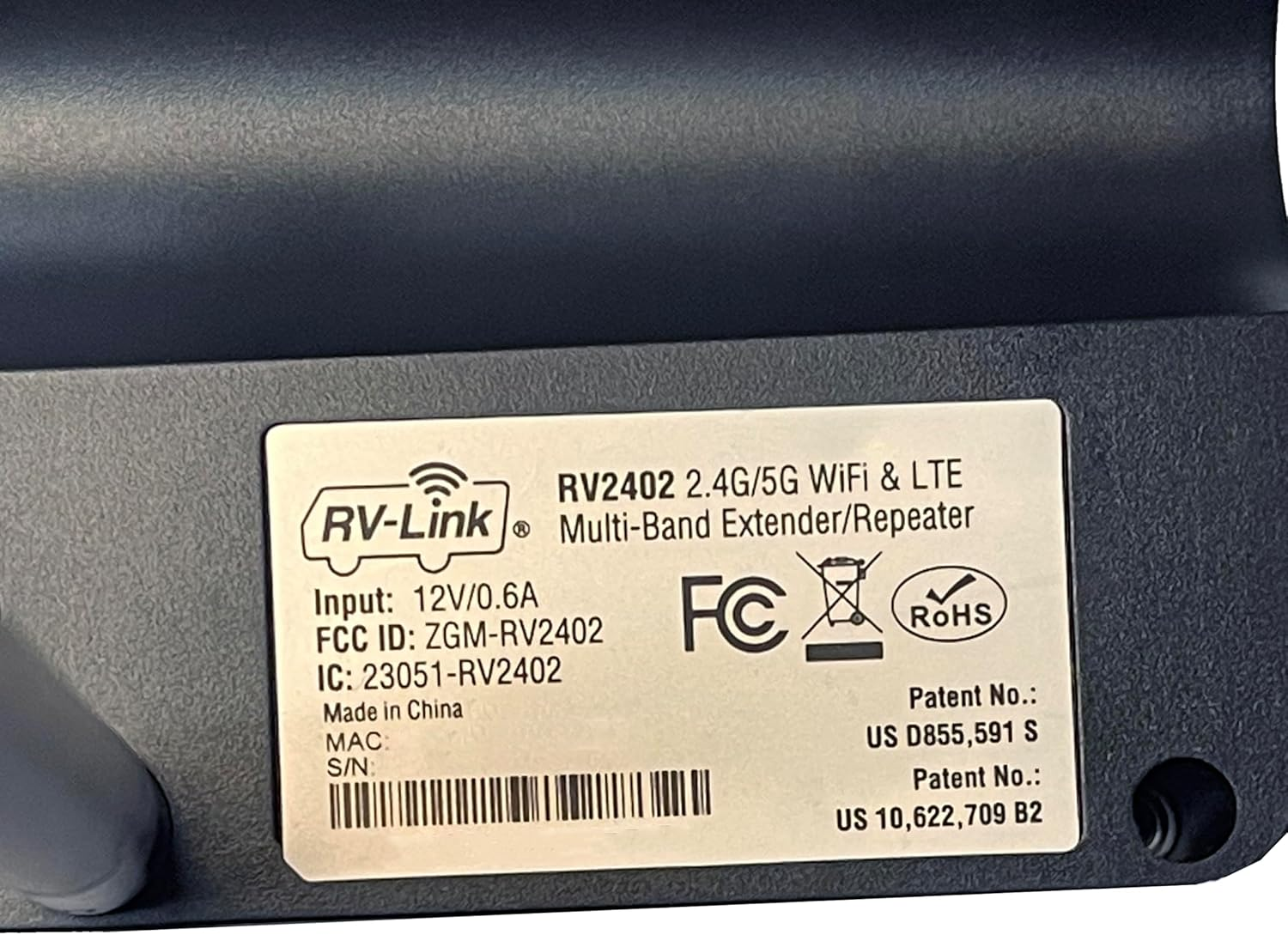
So now I can have a look inside the unit at no cost to me (effort or otherwise...) and this revealed 2 very valuable pieces of information: 1. The LTE modem being used is a Quectel EC25 and 2. The star of our little show here is a Qualcomm QCA9531-BL3A SoC
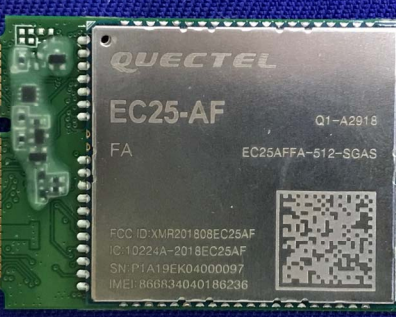
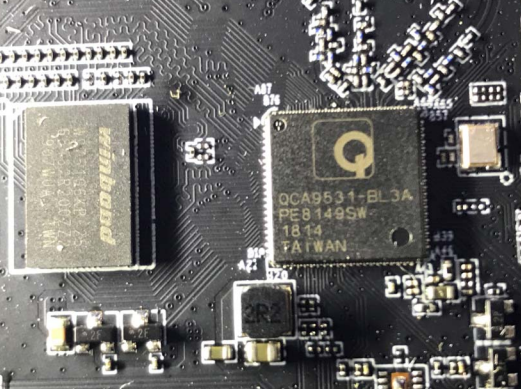
So, I thought of a new approach. By searching for COMFAST 'Outdoor CPE' (a more accurate descriptor than 'wireless bridge') models featuring the QCA9531 SoC and integrated LTE (specifically the Quectel EC25 modem found in the MV2402), I zeroed in on the COMFAST CF-E5. Online listings explicitly mention the QCA9531+EC25 chipset combination for the CF-E5, making it a very strong candidate for the MV2400's base platform. I confirmed the FCC ID ZGM-MV2402 belongs to Magnadyne, the applicant, not COMFAST itself.
2. Firmware Analysis: Hello OpenWrt!
The awesome thing about this is that the CF-E5 is a retail product sold and supported by COMFAST. This means there are publicly available firmware images. 😼 I quickly obtained a firmware image for what I suspected was the base model (CF-E5-V2.6.1.1.bin). Running binwalk on this image revealed a standard structure for embedded Linux firmware:
- U-Boot Image Header (
uImage) - LZMA-compressed Linux Kernel
- XZ-compressed Squashfs root filesystem
$ binwalk CF-E5-V2.6.1.1.bin

DECIMAL       HEXADECIMAL     DESCRIPTION
--------------------------------------------------------------------------------
0             0x0             CPU: MIPS, image name: OpenWrt Linux-3.10.44
64            0x40            LZMA compressed data
1572864       0x180000        Squashfs filesystem, little endian
(I've truncated the full output for brevity, but this shows the key components.)
Critically, the kernel image name, 'MIPS OpenWrt Linux-3.10.44', explicitly identified the OS. This confirmed that the Roof Unit likely runs OpenWrt (or a close derivative), built around a slightly older Linux kernel (v3.10.44) but, according to the firmware image, with a build date in 2022. Knowing it's OpenWrt is fantastic news, as it provides a familiar structure for configuration (e.g., /etc/config), services (e.g., /etc/init.d), and standard utilities.
I also noted with some mirth that its create date was specified as 2022-01-18, which roughly lines up with what the representative at Magnadyne had said (that the system was updated about two years prior to this investigation).
3. Filesystem Extraction and Exploration
After troubleshooting dd block sizes, I ultimately went with a 1-byte block size. While incredibly slow, my understanding was that this would ensure I extracted exactly the bytes of the Squashfs image without any overshoot. I also ran into some unusual filesystem compatibility issues (tip: extract on a native Linux filesystem like ext4, not on NTFS via WSL mounts). Eventually, I successfully extracted the Squashfs root filesystem using unsquashfs. Exploration of the extracted filesystem revealed several key details:
- Standard OpenWrt layout (
/etc,/usr,/bin,/sbin, etc.). - Dropbear SSH keys (just host keys nothing juicy) in
/etc/dropbear(matching the Nmap scan). - Unused OpenSSH keys/config in
/etc/ssh. - Nginx configuration in
/etc/nginx/nginx.conf:- Confirmed FastCGI pass for
/cgi-bin/to127.0.0.1:9002. - Identified the default web root as
/www-comfast. - Found web server logging was disabled (
/dev/null). - Discovered HTTPS (port 443) merely redirects back to HTTP (port 80) – no actual encryption!
- Confirmed FastCGI pass for
- Dropbear configuration in
/etc/config/dropbearconfirmed password authentication and root login via password are enabled. So, if we do figure out the root password somehow it would be possible to login.
4. Identifying the Custom API Handler: webmgnt
Searching the /etc/init.d/ directory within the extracted filesystem for clues about the FastCGI backend (which we knew was listening on port 9002) quickly led me to a non-standard script: /etc/init.d/webcfg. Examining this script revealed that it simply launches and manages (via OpenWrt's procd service manager) a single binary: /usr/bin/webmgnt.
This executable, webmgnt, isn't part of the standard OpenWrt distribution. To get a feel for its purpose before diving into disassembly, I ran the standard strings utility on the binary. This yielded a wealth of information, confirming that it linked against OpenWrt libraries like libuci (for configuration management) and libfcgi (for handling FastCGI requests). The output also contained strings matching many expected API function names (e.g., cgi_login, wifi_scan, get_ec20_status_info, system_upgrade_keep).
Crucially, the strings output also included:
motorhome_config_setsystem_remove_motorhome_wifi_listmotor_home_list_get
Finding these 'motorhome'-specific strings (such as motorhome_config_set, system_remove_motorhome_wifi_list, and motor_home_list_get) within the firmware binary for the generic COMFAST CF-E5 was a significant discovery. Why would firmware for a standard outdoor CPE contain functions explicitly named for RV use?
This discovery strongly supports my hypothesis about an OEM relationship between COMFAST and Magnadyne/RVLink. It's highly likely that Magnadyne commissioned COMFAST to add these specific RV-centric features to the base CF-E5 firmware platform for use in the RVLink product line. These custom additions, once integrated into COMFAST's codebase for this hardware, appear to have remained in subsequent generic firmware builds, such as the CF-E5-V2.6.1.1.bin image I analyzed.
This evidence confirms that /usr/bin/webmgnt is the custom application—likely developed by COMFAST based on Magnadyne's requirements—that handles the FastCGI requests and implements the proprietary mbox-config API logic, including the RV-specific functions. Analyzing this binary was, therefore, the clear next step.
5. Reverse Engineering webmgnt with Ghidra
Loading /usr/bin/webmgnt into Ghidra initially presented challenges. The breakthrough came when I realized that key functions were compiled as MIPS16 (a compressed instruction set supported by the QCA9531 SoC) instead of standard MIPS32. Setting the processor context correctly in Ghidra was crucial for successful decompilation.
- Analysis of
webcfg_main: Confirmed this is the main FastCGI loop. It accepts requests, parses parameters (including theHTTP_COOKIEforCOMFAST_SESSIONID), and dispatches to handler functions based on theSCRIPT_NAME. - Located Handler Tables: I found data structures (e.g.,
cgi_functions,mbox_config_funcs_get,mbox_config_funcs_setthat map endpoint names (like 'login', 'mbox-config') and API section names (like 'wan_config', 'system_reboot') to their corresponding handler function addresses within the binary. - Analyzed Specific Handlers:
motorhome_config_set: Confirmed this handler parses SSID/Key parameters, usesuci setcommands to configurewireless.wwanandnetwork.wan, and crucially, callssystem("rm /etc/lte_mode");. I believe this call triggers the switch from LTE to Wi-Fi WAN.systemlog_get: This handler executeslogread > /tmp/systemlogviasystem()and returns the log content in the JSON response.udisk_list: Executesblkidanddf -h | grep /mnt/sdviapopen()to list USB drive information. This was somewhat unexciting, as there didn't appear to be any relevant block devices to list on the unit.network_config/system_usage: Confirmed these handlers aggregate data from various internal functions and system calls.- Other handlers for retrieving information like IMEI/CCID, firmware details, etc., were also identified via these tables.
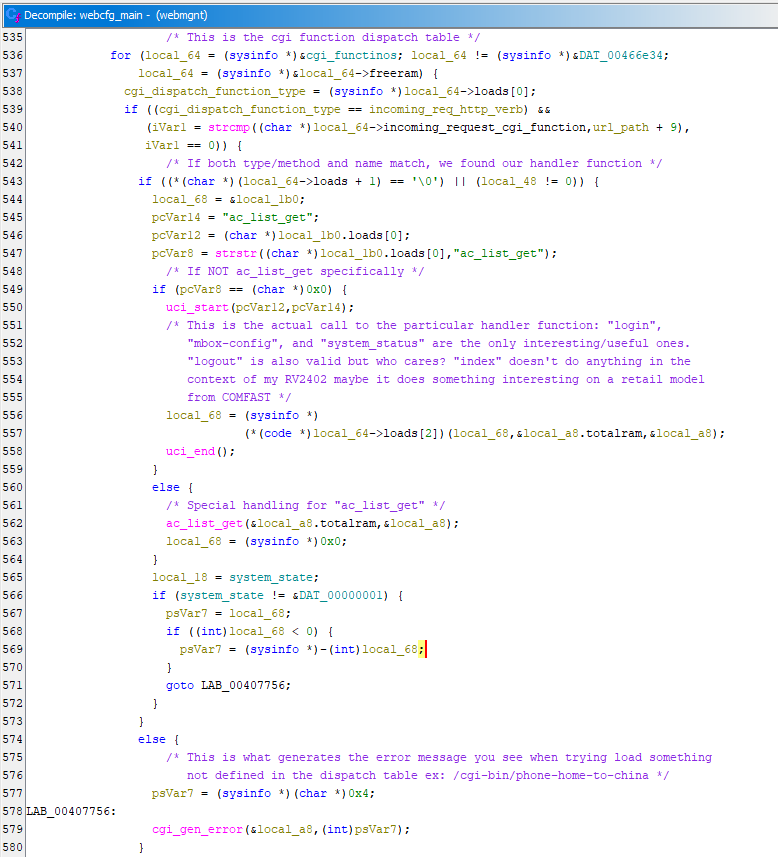
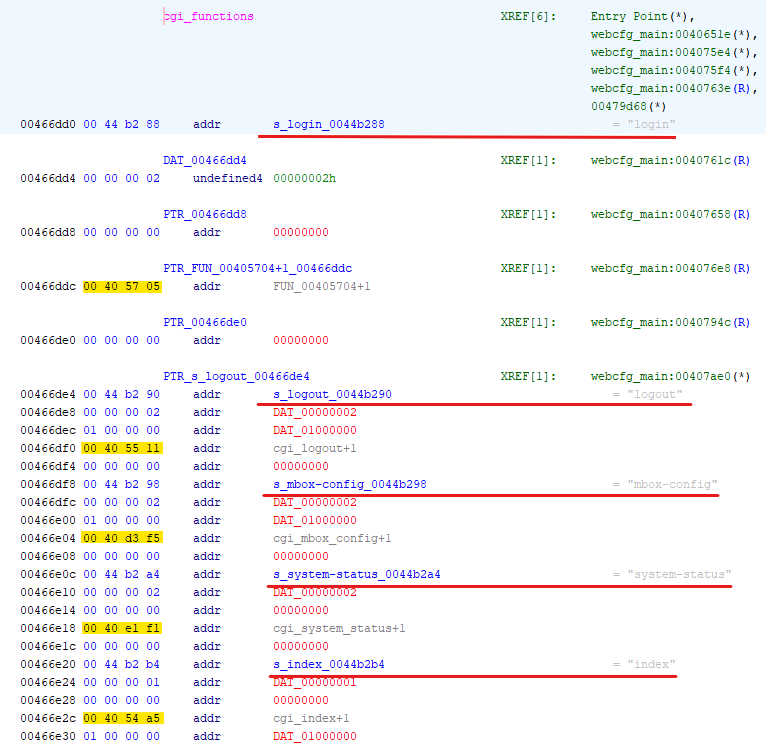
In the screenshot above is actually an array of 5 structs that look something like this:
struct cgi_function
{
    char *; // cgi endpoint name
    unit32; // Probably a pointer to the most recent blobmsg response sent
    unit32; // ** AUTH REQRUIED ** boy I wish I had noticed this sooner
    func *; // Handler function to be called when endpoint is hit
    unit32; // Still dunno
};
6. Root Password Hash Found!
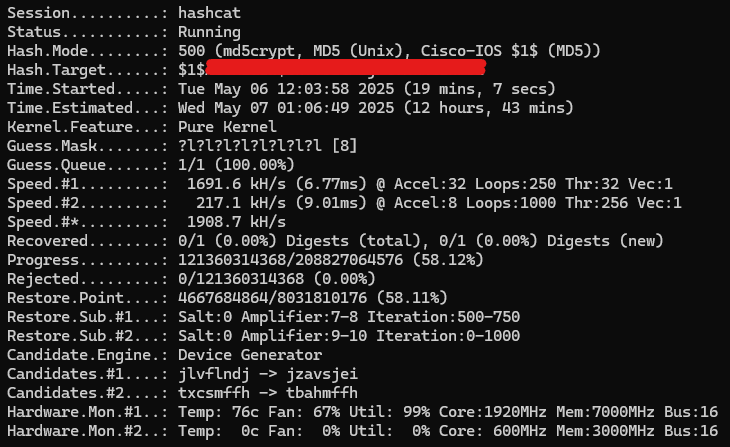
Analyzing /etc/shadow revealed the password hash for the root user: $1$__REDACTED_SALT__$_________REDACTED__HASH_________. This hash is in the MD5 Crypt format. Due to the relative computational speed of MD5 Crypt, this hash is potentially crackable offline using tools like Hashcat (with the -m 500 option) or John the Ripper, employing standard wordlists.
7. API Script Enhanced
So, one of the big wins here was identifying a vast number of API endpoints (97 GET endpoints for the mbox-config function alone) that are functional on my Roof Unit. Many of these weren't revealed by simply examining the web application running on the Indoor Unit. This discovery further reinforces the hypothesis that the COMFAST firmware I analyzed is essentially what is running on the Roof Unit.
I added several new GET endpoints (e.g., /udisk_list, /network_config, /system_log, /system_usage) to my Python FastAPI wrapper script, refining the Pydantic models based on the insights from reverse engineering and by observing the raw JSON responses. I also added a generic /test_get_section/{section_name} endpoint to my script, allowing for easy probing of other API sections identified in the function tables discovered earlier. Strangely—and perhaps this was intentional to mislead investigators—two separate endpoints for retrieving the current firmware version both report the board name as 'COMFAST CF-WR305S'. This model number actually corresponds to the Indoor Unit, which broadcasts the private Wi-Fi network. If this was an intentional attempt to obscure the hardware's origins, then congratulations to them—they did manage to waste some of my time at the beginning of this project!
{
  "firmware": {
    "version": "RV-RV2402-V1.0.1.2",
    "board_name": "COMFAST CF-WR305S",
    "uptime": 79359,
    "maketime": " Tue May 5 09:12:17 CST 2020\n",
    "macaddr": "40:a5:ef:e6:87:4b"
  },
  "cpumodel": {
    "cpumodel": "Qualcomm Atheros QCA9531 ver 2 rev 0\n"
  },
  "errCode": 0,
  "errMsg": "OK",
  "configDone": false
}
Response from the "firmware_info" endpoint
{
  "firmware": {
    "version": "RV-RV2402-V1.0.1.2",
    "board_name": "COMFAST CF-WR305S",
    "uptime": 79428,
    "maketime": " Tue May 5 09:12:17 CST 2020\n",
    "macaddr": "40:a5:ef:e6:87:4b"
  },
  "errCode": 0,
  "errMsg": "OK",
  "configDone": false
}
Response from the "firmware_version_get" endpoint
Conclusion & Next Steps (Part 3 Preview)
This comprehensive deep dive into the COMFAST CF-E5 firmware yielded a wealth of significant results. Through this analysis, I have:
- Confirmed the system's OpenWrt foundation.
- Identified
/usr/bin/webmgntas the custom API handler. - Successfully decompiled key MIPS16 functions within
webmgnt. - Mapped a multitude of previously undocumented API endpoints.
- Understood the critical mechanism used by the system to switch between Wi-Fi and LTE WAN modes.
- Recovered the password hash for the
rootuser.
Part 3 will focus on:
- Results of the password hash cracking attempt.
- Further analysis of
webmgnt, specifically looking for vulnerabilities (command injection, overflows) in the SET function handlers. - Fully documenting the mapped API endpoints.
- Can the algorithm for generating the COMFAST_SESSIONID cookie be reversed and reimplemented client side?
- Understanding what http://{INDOOR_UNIT_IP}/data/set_setting.html actually does to trigger changes to be applied on the roof unit and build this functionality into my own API.
- I'll be getting the network tap installed as a part of this, I'll be able to capture all traffic between the two units with my Mikrotik router which I think will help peel back the final layer