Giving Claude Read-Only SQL Access to My Entire Homelab
A FastMCP server, two database engines, and three layers of "please don't break anything"
The last time I built an MCP server, I gave Claude access to my Obsidian vault. That was useful — it could rummage through my notes and find things I'd long forgotten. But there was a gap. My homelab runs 32 databases across two servers, and every time I needed to check a schema or look up a value, I was running queries by hand. Which kind of defeats the purpose of having an AI assistant that's supposed to know things.
So I built another MCP server. This one gives Claude read-only SQL access to both stygies (MariaDB, 17 databases) and phlegethon (PostgreSQL, 15 databases). It can list databases, describe tables, sample data, and run arbitrary SELECT queries — but it absolutely cannot write, delete, or modify anything.
The paranoia is the feature.
The Three-Layer Safety Model
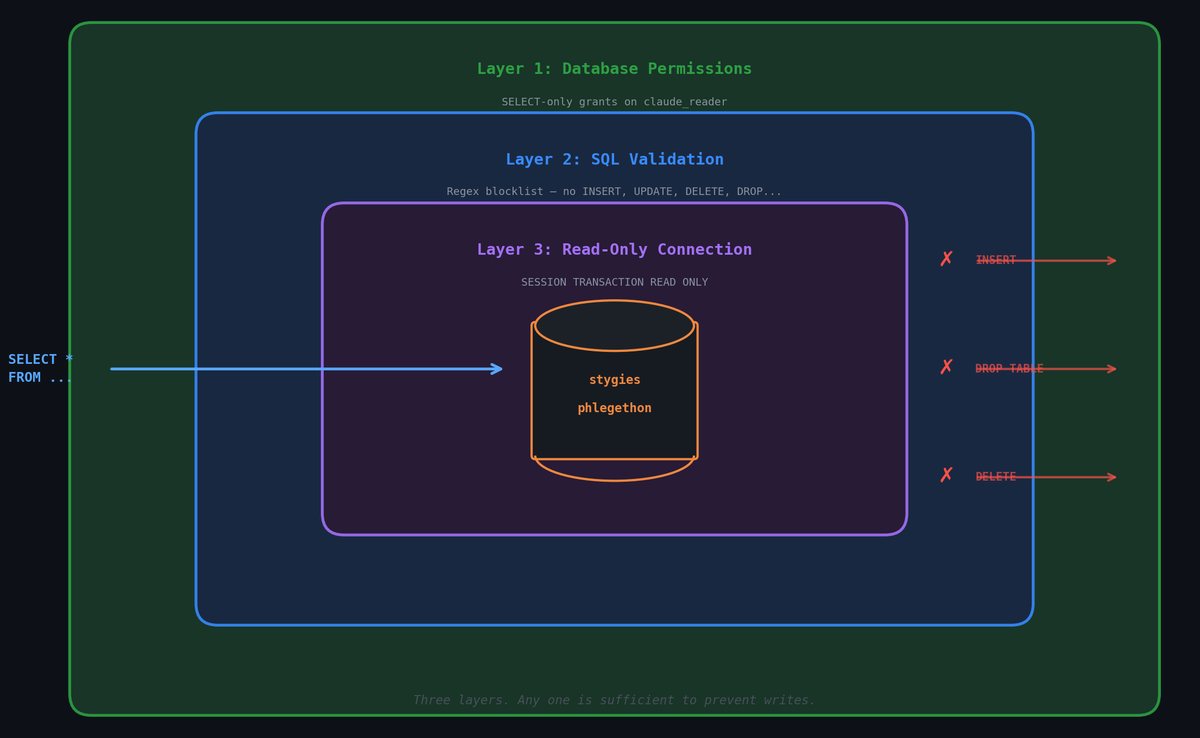
When you're giving an AI tool direct database access, you don't want to rely on a single safety mechanism. Things fail. Regexes miss edge cases. Models hallucinate creative SQL. So there are three independent layers, any one of which is sufficient to prevent writes:
Layer 1: Database Permissions. The claude_reader user has exactly SELECT and SHOW DATABASES on MariaDB, and SELECT on each database in PostgreSQL. Even if every other safeguard fails, the database engine itself will reject any write operation. This is the load-bearing wall.
Layer 2: SQL Validation. Before a query touches the database, it passes through a regex gauntlet. It must start with SELECT, WITH, or EXPLAIN. A keyword blocklist catches INSERT, UPDATE, DELETE, DROP, ALTER, CREATE, TRUNCATE, and a dozen other verbs that have no business in a read-only tool. Is this foolproof? No. But it catches the obvious cases before they even leave the Python process.
Layer 3: Connection-Level Read-Only. Every connection sets SESSION TRANSACTION READ ONLY (MariaDB) or default_transaction_read_only = ON (PostgreSQL). Even if a rogue query somehow passes validation and the user permissions are misconfigured, the connection itself refuses to write.
Belt, suspenders, and a rope tied to the rafters.
The Tools
Five tools, all taking a server parameter of either "stygies" or "phlegethon":
list_databases— What databases exist? Starting point for exploration.list_tables— What's in a database? UsesSHOW TABLESfor MariaDB,information_schemafor PostgreSQL.describe_table— Column names, types, nullability, defaults, and indexes. The schema at a glance.select_query— Run an arbitrary SELECT. Auto-appends aLIMITclause if you forget one (max 500 rows). Truncates cells over 200 characters. Returns a markdown table.table_sample— Convenience wrapper:SELECT * FROM <table> LIMIT <n>. For when you just want to see what the data looks like.
Everything returns markdown. Claude reads markdown. It works.
The PostgreSQL Annoyance
MariaDB is simple: one GRANT SELECT ON *.* and the user can read any database, now and in the future. PostgreSQL makes you work for it. Every new database needs its own set of grants:
GRANT CONNECT ON DATABASE newdb TO claude_reader;
GRANT USAGE ON SCHEMA public TO claude_reader;
GRANT SELECT ON ALL TABLES IN SCHEMA public TO claude_reader;
ALTER DEFAULT PRIVILEGES IN SCHEMA public GRANT SELECT ON TABLES TO claude_reader;
That last line — ALTER DEFAULT PRIVILEGES — is the one you'll forget. It ensures tables created after the grant are also readable. Without it, you'll add a table next month and wonder why Claude can't see it.
I added a full copy-pasteable command block to my CLAUDE.md so Future Me doesn't have to rediscover this.
What This Unlocks
Before, a conversation about my bandwidth data or Firefly transactions went like this:
Me: "What columns does the scrape_data table have?" Me: opens terminal Me: ssh root@talos... pct exec 301... mysql... Me: copies output, pastes into chat Claude: "Okay, based on that schema..."Now it's:
Me: "Look at the scrape_data table on stygies and tell me about the bandwidth trends." Claude: calls list_tables, describe_table, select_query Claude: "Here's what I see..."
It's a small thing. But small things compound. Every time I don't context-switch to a terminal/dbeaver, I stay in the problem I'm actually trying to solve.
The Stack
- FastMCP for the MCP server framework (same as my Obsidian RAG server — 398 lines for both combined)
- psycopg for PostgreSQL, mysql-connector-python for MariaDB
- stdio transport — Claude Code spawns the server as a subprocess, no HTTP involved
- Python 3.14 on both workstations (because I'm on Arch, btw)
The entire server is a single server.py. No config files, no ORM, no framework beyond FastMCP. Connection parameters come from environment variables in the MCP config. I could add connection pooling, but MCP calls are infrequent enough that fresh connections per call are fine.
Setup Notes
If you're doing something similar:
- Create dedicated read-only users. Don't reuse existing credentials. The principle of least privilege exists for a reason.
- Test with destructive queries. Actually try to
INSERTorDROPsomething. Watch it fail at all three layers. Sleep well. - MariaDB's
SHOW DATABASESgrant is separate fromSELECT. Without it, the user can query tables but can't discover what databases exist. Annoying to debug. - PostgreSQL's per-database grants are tedious but correct. Write a script. Add it to your runbook. You'll thank yourself.
- Cell truncation matters. Without it, a single
TEXTcolumn with a 50KB value turns your response into an unreadable wall. 200 characters per cell is plenty for exploration.
This is the second MCP server in the homelab stack. The first one searches my Obsidian notes. Together they give Claude a pretty complete view of both my documentation and my data — everything it needs to be genuinely useful for infrastructure work, without the ability to change anything. Which is exactly the right amount of power.